Firefox has been my favourite web browser for a decade. Recently I started using Chrome in Linux because it performs better on most web pages, but there doesn't seem to be a Chrome performance advantage in Windows. Experiences with Chrome show that it is a good browser, but I prefer Firefox because I prefer Mozilla over Google.
Nowadays, Google is the Microsoft of the Internet. They own some of the most popular web sites plus the most popular web browser. Advertising is their main source of revenue, which makes them bad for privacy. Potentially giving so much of my information to Google does not seem good.
It seems like Firefox has lost its way recently. New unpopular features were added, while old features were removed, upsetting some loyal users. There doesn't seem to be much real progress. I hate how it won't be possible to disable extension signing, which means you will need to install a different build if you want to use an extension which wasn't signed via Mozilla. However, all of that was ultimately acceptable.
What really made me stop and think was when Pwn2Own announced that Firefox won't be attacked because it is too easy. Looking at comments on several sites, I didn't really see a valid defense of Firefox. Instead, some people expressed an irrational conviction that Firefox is safe and doesn't need security improvements. Then I looked at statistics on exploits, comparing Chrome to Firefox. In 2015, Chrome had 8 code execution vulnerabilities, and Firefox had 83. Previous years show a similar pattern.
Is using Firefox in Windows unwise because it is less secure? Running it in Linux probably gives you security through obscurity, but I'm already using Chrome in Linux.
Firefox will eventually get sandboxing via Electrolysis, but when? It seems like that has been "coming soon" for a long time. Is waiting for it to be released a good idea?
Monday, February 15, 2016


Friday, February 12, 2016
Don't use the Miranda NG Facebook plugin
Since Facebook disabled XMPP (Jabber), the options for connecting to Chat via a third party plugin are limited. Miranda NG, my favourite IM client, has a Facebook protocol which I was using. I had been getting captchas for sending or posting totally innocent links, like even Wikipedia or Slashdot, and even via the web interface. I didn't know what was causing this. Then I switched from the stable to the development Miranda NG version so I could use the SkypeWeb plugin. Soon after that, Miranda NG said my computer is infected and needs to be cleaned. After doing a bit of searching, I found that others had similar problems due to Miranda NG. Since then I intermittently can't send links at all.
It has been a few days since I stopped using the Miranda NG's Facebook protocol, the problem hasn't gotten better, and I'm annoyed. I don't want to use an instant messaging application which has the capability of blocking messages based on content. Much older IM protocols which allow direct connections between clients are so much better. I'm also not happy with their ability to block links in posts.
Basically, Facebook is a piece of shit which I use because others use it. Social networking should function via an Internet standard, not via proprietary web sites. It should be distributed, so you can select or run a server, instead of just logging in to one place.
I'm deactivating Facebook because it's too annoying now. Maybe eventually when I reactivate, it won''t annoy me with captchas and link blocking.
The purple-facebook plugin for Pidgin claims to use the protocol used by the Android Facebook Chat application. That could work better and not trigger captchas. Pidgin is worse than Miranda, lacking in features and flexibility. It's okay though, and I may start using in in Windows because of this.
Wednesday, February 03, 2016
Testing a 10X macro lens filter
The Olympus C-770 Ultra Zoom camera already has good macro capability, so there is no need for anything to help with that. However, experiments with a magnifying glass showed an interesting possibility for macro photography with zoom, and the 10X filter was very inexpensive at dx.com after the 2015 holiday $3 off $6 gift card.
Here's an nRF24L01+ module with C-770 super macro mode, without the macro lens filter. This is as close as I could get.

 Using maximum zoom, it's possible to get even more magnification. There is significant image quality degradation, but you still get to see a lot more detail. You can see individual strokes of the laser engraving of the frequency on the crystal.
Taking these kinds of pictures required manual focus. Both the depth of field and the range of focus adjustment are very limited. It's easiest to set a specific focus, and then move the camera to optimize sharpness. The camera's focus adjustment would probably come in handy for focus stacking if it was mounted securely.

 For best magnification, I set the focus to the closest possible position. Due to the 10x macro lens filter, the actual camera distance is nice. It's not too close, allowing for good lighting, and not too far either.
I got the best sharpness at f/8. It seemed to minimize the hazy blurring seen in the above photos. It required good lighting to prevent blur from camera shake, but that's easy when the camera doesn't need to be too close to the subject.
With a more open aperture, there was an increase in blur when I half-pressed the shutter button, and f/8 decreased that. I nevertheless made my final focus adjustments with the shutter button half pressed.
This is a vacuum fluorescent display (VFD). You can see the cathode filaments which heat up and emit electrons, control grids used for multiplexing, and the anodes below them, which light up when electrons hit them.
 This is an MC68705P3S microcontroller. The chip has a window because the program is stored in EPROM, which is erased by ultra-violet light.

Here's an nRF24L01+ module with C-770 super macro mode, without the macro lens filter. This is as close as I could get.

The 10x Macro lens filter allowed me to get a bit closer. It's a very slight improvement in macro capability, with a corresponding decrease in depth of field. Image quality degradation from the filter is minimal.

Taking these kinds of pictures required manual focus. Both the depth of field and the range of focus adjustment are very limited. It's easiest to set a specific focus, and then move the camera to optimize sharpness. The camera's focus adjustment would probably come in handy for focus stacking if it was mounted securely.


I got the best sharpness at f/8. It seemed to minimize the hazy blurring seen in the above photos. It required good lighting to prevent blur from camera shake, but that's easy when the camera doesn't need to be too close to the subject.
With a more open aperture, there was an increase in blur when I half-pressed the shutter button, and f/8 decreased that. I nevertheless made my final focus adjustments with the shutter button half pressed.
This is a vacuum fluorescent display (VFD). You can see the cathode filaments which heat up and emit electrons, control grids used for multiplexing, and the anodes below them, which light up when electrons hit them.


Thursday, December 31, 2015
APC Back-UPS ES 500 BE500U-CN fluctuation in reported battery voltage due to power switch
I first noticed the problem when the Cinnamon desktop in Linux reported the battery was critically low, and even inappropriately hibernated the system although AC power was available. After rebooting into Windows, PowerChute Personal Edition 3.0.2 also said the battery was at 0%, but failed to report this as a problem.
The UPS also reports battery voltage, but that can only be viewed via apcupsd apcaccess or HWMonitor in Windows. HWMonitor gives faster updates, but it can cause blue screen Windows crashes, even after quitting the program, so I recommend apcupsd. Both programs showed voltage fluctuations, from below 11.1V to 13.3V.
The real battery voltage, was 13.60V with the UPS off, and 13.55V with the UPS on. So, the battery and the charger were working properly, and the UPS was measuring an incorrect voltage. The UPS was functional, though the incorrectly low voltage measurements could lead to a short runtime.
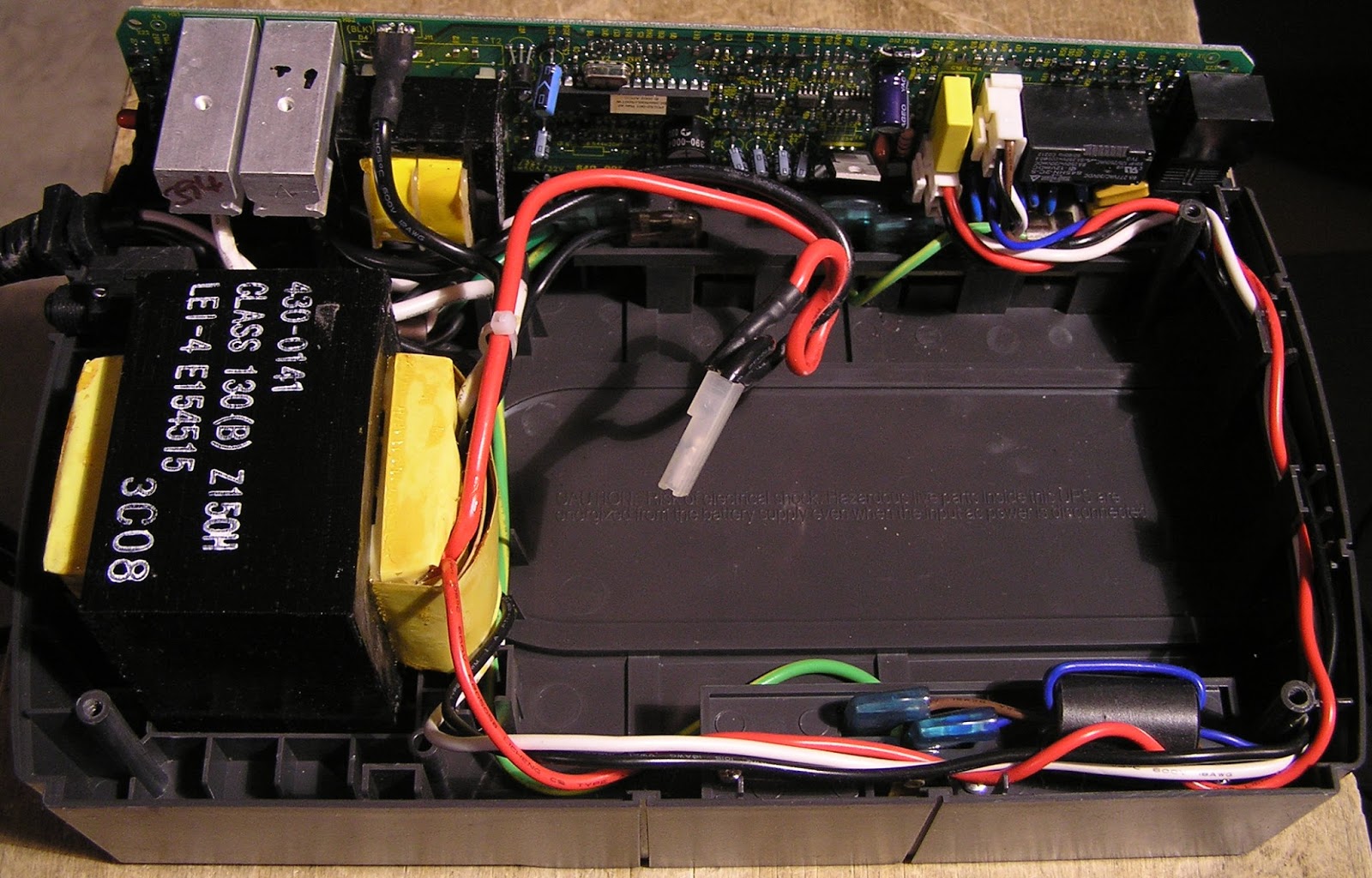
I removed the circuit board from the UPS, and only powered it via the battery connections using a bench supply. This is a safe method for testing. The board does not have any high voltage capacitors, and it cannot produce high voltage without connection to the large transformer mounted elsewhere in the UPS case. The small transformer on the board is only used for powering the UPS circuit from AC and charging the battery.

 The microcontroller on the board is the Microchip PIC16C745. It has an analog to digital converter, so it's reasonable to suspect that the battery is measured that way. According to the data sheet, only 5 pins are usable as ADC channels. By varying the bench supply voltage while measuring voltage at those pins I saw that pin 3 was probably used to measure battery voltage. R15 and R2 form a voltage divider, and C18 is used to smooth the measured voltage. Fluctuations were also happening on the other end of R15, which is the positive "12V" supply to lots of things on the board. The supply comes from the positive battery terminal via the power switch and one of the transistors above the microcontroller.

 I removed C18 just to make sure it is fine, and it was, with extremely low leakage. The problem was the switch for turning on the UPS. Its resistance was unpredictable, sometimes a few ohms and sometimes a few tens of ohms. It only gave zero resistance while I was pushing it in hard.
Although it is a latching pushbutton, it works on the principle of a slide switch. It is DPDT, but is used as an SPST switch with the poles connected in parallel. The switch is hard to unsolder due to all the pins, but it is very easy to disassemble by prying the sides to release the bottom with the contacts. Be careful with the sliding contacts. They are tiny, light, delicate, and nothing is holding them in place. I cleaned them by passing paper moistened in isopropyl alcohol inside them. I also cleaned the stationary contacts that way, and cleaned them from the outside with a pen eraser. After that, the resistance was less than 0.1 Ω and the problem is fixed. I hope it stays fixed.

Note the big metal blocks on the circuit board near the power switch. Those are heat sinks for the inverter MOSFETs. A normal heat sink would have fins to radiate heat. The metal blocks mainly provide heat capacity. The run time of the UPS is limited by battery capacity and charging speed. It is okay if those blocks need an hour to cool down, because battery charging takes even longer. Those heat sinks would need to be replaced if you want to use a much higher capacity battery or use the UPS continuously as an inverter.
The UPS also reports battery voltage, but that can only be viewed via apcupsd apcaccess or HWMonitor in Windows. HWMonitor gives faster updates, but it can cause blue screen Windows crashes, even after quitting the program, so I recommend apcupsd. Both programs showed voltage fluctuations, from below 11.1V to 13.3V.
The real battery voltage, was 13.60V with the UPS off, and 13.55V with the UPS on. So, the battery and the charger were working properly, and the UPS was measuring an incorrect voltage. The UPS was functional, though the incorrectly low voltage measurements could lead to a short runtime.
I removed the circuit board from the UPS, and only powered it via the battery connections using a bench supply. This is a safe method for testing. The board does not have any high voltage capacitors, and it cannot produce high voltage without connection to the large transformer mounted elsewhere in the UPS case. The small transformer on the board is only used for powering the UPS circuit from AC and charging the battery.


Although it is a latching pushbutton, it works on the principle of a slide switch. It is DPDT, but is used as an SPST switch with the poles connected in parallel. The switch is hard to unsolder due to all the pins, but it is very easy to disassemble by prying the sides to release the bottom with the contacts. Be careful with the sliding contacts. They are tiny, light, delicate, and nothing is holding them in place. I cleaned them by passing paper moistened in isopropyl alcohol inside them. I also cleaned the stationary contacts that way, and cleaned them from the outside with a pen eraser. After that, the resistance was less than 0.1 Ω and the problem is fixed. I hope it stays fixed.

Further comments on the APC Back-UPS ES 500 BE500U-CN
Voltage at the battery terminals goes above 14V when the UPS is AC powered and turned off, and no battery is connected. This would be bad for a battery, but even a 10 kΩ resistor is enough to bring the voltage down within acceptable levels. I don't think this is a problem, because there's probably more than 1.4 mA flowing into a fully charged battery.Note the big metal blocks on the circuit board near the power switch. Those are heat sinks for the inverter MOSFETs. A normal heat sink would have fins to radiate heat. The metal blocks mainly provide heat capacity. The run time of the UPS is limited by battery capacity and charging speed. It is okay if those blocks need an hour to cool down, because battery charging takes even longer. Those heat sinks would need to be replaced if you want to use a much higher capacity battery or use the UPS continuously as an inverter.
Monday, December 28, 2015
Not disabling cache before reinitializing TCC76X led to some weird things
My RCA RC3000A digital boombox port of Rockbox started getting unexpected shutdowns at startup after I upgraded it to a newer version of Rockbox. A binary search showed it happened when the audio thread starts, but that made no sense! Simply starting the thread and making it execute a loop which only sleeps was enough to cause shutdowns.
Then I saw that they didn't happen when I loaded via USB boot. It made me suspect that some initialization performed by the Rockbox bootloader caused problems later on when the chip is re-initialized by Rockbox. My first guess was cache, prompted by how ROLO flushes ARM cache but doesn't disable it. Disabling the cache fixed the problem when loading Rockbox via ROLO. It also had to be disabled in another place to fix the bootloader.
The TCC760 uses standard ARM940T cache. I'm not sure if this affects other similar ARM cores or other Telechips SoC families.
Wednesday, December 23, 2015
Switching to tmpfs and unmounting root in Raspbian
This describes how to make a Raspberry Pi running Raspbian use RAM for the root file system. This allows you do things which cannot be done while the root file system is mounted, such as shrinking it with
resize2fs. It would also allow you to write a totally new image to the SD card, overwriting everything. It might also allow you to swap SD cards and write an image to a different card, but I'm not sure that the SD card driver allows it. Here is the script:
cp -r lib bin sbin etc /mnt

mkdir -p mnt/usr/lib/arm-linux-gnueabihf

cp usr/lib/arm-linux-gnueabihf/libarmmem.so mnt/usr/lib/arm-linux-gnueabihf

# Move other mounts

mkdir mnt/dev

mount --move dev mnt/dev

# Pivot root using instructions from pivot_root(8) man page

cd mnt

mkdir old_root

pivot_root . old_root

# The current directory now seems invalid, so fix it

cd /

# Old root can only be unmounted once sh running from old root finishes.

# If enough was copied, you could continue startup normally using init.

exec old_root/usr/sbin/chroot . bin/sh
First, save the script somewhere. To use it, add
init=/bin/sh to /boot/cmdline.txt and reboot. When the boot text finishes, you may not see the # prompt because of kernel output, but the shell should be running, and you'll get another prompt if you press enter.
You must run the script in the shell which is running as init, not a shell spawned from it. That is because the final line needs to end that shell. You won't be able to unmount
old_root if you're still running a shell from it. So, for example if the script is /root2ram, use . /root2ram to run it.
The final line is the place where any errors will manifest themselves. You would get a kernel panic if
chroot or sh can't run. If you're experience a problem, comment out the last line and look at the state of the system at that point.
The script is intentionally minimalist. All of Raspbian won't fit into RAM, so it only copies some parts. Some binaries in
/bin and /sbin require libraries from /usr/lib/arm-linux-gnueabihf/, and only the most commonly used one gets copied. The script does not umount old_root at the end so you can test whatever you want to run and copy anything else you need before manually unmounting it.
This has been tested on a Raspberry Pi 2 B running Raspbian Jessie. If you want to run it on a Raspberry Pi with less RAM, you might need to be more specific when copying from
When you are done and you want to boot normally, simply remove
/lib. It is big and there are un-needed things there.When you are done and you want to boot normally, simply remove
init=/bin/sh from /boot/cmdline.txt. You would need to mkdir boot && mount boot. Vi is in /usr/bin, but sed is in /bin and you can use sed -i 's,init=/bin/sh *,,' /boot/cmdline.txt to edit it. Normal rebooting won't work without init, so umount /boot ; sync && reboot -f.Thursday, December 17, 2015
WM_SYSCOMMAND SC_SCREENSAVE doesn't work anymore for activating the screen saver?
I use HoeKey as my hotkey program in Windows 7. One hotkey is supposed to activate the screen saver:
This waits one second to avoid the key release event, and then sends a WM_SYSCOMMAND SC_SCREENSAVE message. It failed a few times in the past, but it generally worked. Now it fails all the time. I wonder why?
This doesn't seem to be a HoeKey problem, because a trivial C program can't activate a screen saver this way either. However, SC_MONITORPOWER always works in both HoeKey and the C program, shutting off the monitor when lParam is 2.
In the past when it failed I thought it was due to the adaptive screen saver timeout, but disabling that doesn't help.
^`=Wait|1000
=Msg|0|274|61760|0      ; start screensaver
This waits one second to avoid the key release event, and then sends a WM_SYSCOMMAND SC_SCREENSAVE message. It failed a few times in the past, but it generally worked. Now it fails all the time. I wonder why?
This doesn't seem to be a HoeKey problem, because a trivial C program can't activate a screen saver this way either. However, SC_MONITORPOWER always works in both HoeKey and the C program, shutting off the monitor when lParam is 2.
In the past when it failed I thought it was due to the adaptive screen saver timeout, but disabling that doesn't help.
Emscripten 1.34.2 and later can reveal more alignment problems
Em-DOSBox started getting graphical corruption when built with recent versions of Emscripten. This was due to improper alignment of a statically allocated variable, which was declared as 8 bit values but also accessed as 16 and 32 bit.
Here is the Emscripten change which triggered the problem. It changes the alignment of variables which are allocated at compile time. Previously, they were 64 bit aligned. Afterwards, they are aligned as appropriate for their data type. 8 bit values don't need any alignment, and so they can end up improperly aligned for 16 and 32 bit access. This change is in emscripten-fastcomp, between 1.34.1 and 1.34.2 tags. Variable alignment depends on the build used during the final Emscripten link.
This is not an Emscripten problem, but an issue in DOSBox which started causing problems after that Emscripten change. If you think you may be dealing with an alignment problem, link the program with -s
SAFE_HEAP=1. That will cause misaligned access to report and alignment error and throw an exception. You may also want to use a lower level of optimization or at least --profiling-funcs, so it is easier to find where the problem is occurring.
Subscribe to:
Posts (Atom)