If you run Virtual TI 2.5 beta 5 under Windows 7, it fails with an error dialog which says "Failed to set data for 'LastEmuVersion'". A simple workaround is always running Virtual TI as Administrator, but that gets annoying.
The error means that Virtual TI was unable to save settings in the registry. It attempts to save settings under HKEY_LOCAL_MACHINE\SOFTWARE\ACZ, and it is not allowed to write there. Instead, it should be saving them under HKEY_CURRENT_USER\Software\ACZ. Normally, Windows 7 registry virtualization would automatically fix this problem by redirecting writes HKEY_CURRENT_USER\Software\Classes\VirtualStore\MACHINE\SOFTWARE\ACZ, but something goes wrong.
To fix the problem, open regedit and grant yourself write access to KEY_CURRENT_USER\Software\Classes\VirtualStore\MACHINE\SOFTWARE\ACZ and all of its child objects. If the key doesn't exist, create it.
Saturday, October 02, 2010


Wednesday, September 29, 2010
A quick summary of some TI-85 emulators
I tried a few TI-85 emulators, hoping that they would be more convenient than testing code on a real calculator. Here are some observations using my version 9 TI-85 ROM:
- Wabbitemu has a nice user interface. The TI-86 skin looks great, and it's nice how I get visual feedback when I press buttons. I don't mind that it's not a TI-85 skin. However, there doesn't seem to be any way to transfer TI-85 files to the emulator, so it's useless for development.
- TilEm 0.972 looks kind of ugly due to the scaled up low resolution skin, and the screen standing out too much. Multiple attempts to transfer a backup to the calculator failed, and so I couldn't use it for running assembler programs. I couldn't get 0.973 to display the skin.
- Virtual TI 2.5 has some problems, but it is usable. In Windows 7, it has to be run as Administrator (or else I get a "Failed to set data for 'LastEmuVersion'" error). I've had some linking failures, but I was generally able to transfer a backup after resetting the calculator. When transferring variables, I got annoying linking errors whenever a variable under that name exist, so I'm forced to delete variables before re-uploading them. The skin looks worse than Wabbitemu, but it is a TI-85 skin which looks like my TI-85, and it looks a lot better than TilEm.
Sunday, September 26, 2010
Usgard relocation table format
Usgard is the most recent and most capable assembly shell for the TI-85 graphing calculator. It can run ZShell programs, but it also offers additional functionality which can be used when writing programs specifically for Usgard. The primary advantages are relocation and functions for accessing TI-85 variables.
On the TI-85, assembler programs are stored in string variables, and they execute in-place. The initial location of the variable depends on the amount of free RAM, and the variable can me moved when other variables are deleted. Because of this ZShell code cannot rely on being at a fixed address. Usgard's relocation almost removes this concern. At the end of a program is a list which shows what locations in the code need to be updated with the current position. The list contains two kinds of entries:
To perform relocation, Usgard needs to add the current offset of the program to all of the locations requiring relocation. When the program terminates, Usgard undoes these changes by subtracting the current offset from the locations.
The only disadvantage of Usgard relocation is that the relocation table is created via a sort of kludge using an ancient toolchain which runs in MS-DOS. All operands which require relocation need to be prefixed with an ampersand. Before assembly, the code is preprocessed via SRCWIZ.EXE, which removes the ampersands and adds labels of R_ followed by a number, with the number starting at zero. Then, this code is assembled, and STRING85.EXE creates the relocation table based on the listing produced by the assembler. A batch file ties all this together and at the end replaces the files altered by SRCWIZ with the originals.
Several programs in the Usgard directory were compiled with old Borland Pascal compilers. They fail with "Runtime error 200", meaning divide by zero, because modern computers are too fast for Borland Pascal delay loop calibration. Fortunately, this is easy to fix with TPPATCH.
Overall, the toolchain works, but I would prefer something more modern. Maybe I'll try using the GNU assembler or even the Small Device C Compiler (SDCC).
On the TI-85, assembler programs are stored in string variables, and they execute in-place. The initial location of the variable depends on the amount of free RAM, and the variable can me moved when other variables are deleted. Because of this ZShell code cannot rely on being at a fixed address. Usgard's relocation almost removes this concern. At the end of a program is a list which shows what locations in the code need to be updated with the current position. The list contains two kinds of entries:
- a single byte, whose value is the offset of the current relocation position minus the offset of the previous relocation position.
- a zero byte, followed by a 16 bit little endian absolute offset of the relocation position.
To perform relocation, Usgard needs to add the current offset of the program to all of the locations requiring relocation. When the program terminates, Usgard undoes these changes by subtracting the current offset from the locations.
The only disadvantage of Usgard relocation is that the relocation table is created via a sort of kludge using an ancient toolchain which runs in MS-DOS. All operands which require relocation need to be prefixed with an ampersand. Before assembly, the code is preprocessed via SRCWIZ.EXE, which removes the ampersands and adds labels of R_ followed by a number, with the number starting at zero. Then, this code is assembled, and STRING85.EXE creates the relocation table based on the listing produced by the assembler. A batch file ties all this together and at the end replaces the files altered by SRCWIZ with the originals.
Several programs in the Usgard directory were compiled with old Borland Pascal compilers. They fail with "Runtime error 200", meaning divide by zero, because modern computers are too fast for Borland Pascal delay loop calibration. Fortunately, this is easy to fix with TPPATCH.
Overall, the toolchain works, but I would prefer something more modern. Maybe I'll try using the GNU assembler or even the Small Device C Compiler (SDCC).
Wednesday, July 07, 2010
A guide to some Southwestern Ontario fruit
I was born in Zadar, on the Croatian Adriatic coast. Compared to fruit available there, a lot of fruit in Ontario is terrible. It's kind of like listening to a 32kbps MP3 or PC speaker playback instead of a CD. Often, major components of taste are barely noticeable or missing. Some fruit can even be tasteless or a bad mix of unripe and rotten. Sometimes, it's possible to obtain good fruit by buying it from roadside stands and picking your own. Here I will list some of what I discovered.
Strawberries
In spring, some very nice imported strawberries may be found in supermarkets. Many Ontario strawberries are less sweet and tasty and/or more acidic. However, I have repeatedly found good strawberries at Schoger Orchards (432 County Rd. 34, between Essex and Cottam, 519-839-4675) and Raymont's Berries. Usually, local strawberries are only available in June, but at Raymont's Berries, they're available from around mid May to Thanksgiving or beyond. It seems pick your own is only available in late spring, but good prices on already picked flats and large baskets are available year round.
Note that strawberries don't need to be fully dark red. In fact, the really dark ones are overripe, less tasty, and more vulnerable to spoilage. Those with a bit of lighter colour on them can still be ripe, sweet and tasty. Also, note that while larger size makes picking easier, it doesn't guarantee good taste.
Sweet Cherries
Ontario cherries are usually less sweet, less tasty and more acidic. In almost all cases, the imported cherries in the supermarket are better. So far, I've found one exception: Red Barn near Arkona. Unlike most Ontario cherries, theirs are very dark red and almost black. The taste is not quite as amazing as the colour implies but it is good. The orchard is also a pleasant place to pick, because of the beautiful large trees which provide shade. Sturdy ladders are available, but not necessary, because many cherries can be picked from ground level. At least two other nearby farms also have good black sweet cherries.
Sour Cherries
I've never found especially good sour cherries in Ontario. They usually have very little taste other than sourness. So far, the best I've found are in the Arkona area. If you're there for picking sweet cherries, maybe also pick up some sour cherries, but don't expect too much. The cherries can be used to make a nice pie, and free pitting is available if you don't want to pit cherries yourself.
Raspberries
Some very good raspberries may be found in Ontario. They're available two time periods: early summer and late summer through early fall. However, not every place has raspberries during both periods. I've found good raspberries at Schoger Orchards and Awesome Berries & Gardens (where Northville Rd. ends at Townsend Line, near Arkona). The fall raspberries at Parks Blueberries were less tasty.
Note that raspberries are quite easy to grow yourself They're almost like a weed, spreading surprisingly fast via roots. Also, note that like with strawberries, very dark raspberries are overripe.
Blueberries
Blueberries may be the best fruit that Ontario has to offer. They cay be sweet and intensely tasty. Pick your own blueberries are available at Klassen Blueberries and Parks Blueberries.
I prefer Parks, because I've had a more consistently good experience with their blueberries. At Parks, you get a choice of up to four different varieties. I usually chose Bluecrop and I also like Reka.
At Klassen, there was never any choice in what variety to pick, and the blueberries were acidic and less tasty early in the season. However, later on I also found good blueberries at Klassen, and Klassen usually had a longer picking season.
Peaches
Ontario is definitely capable of producing very good peaches. Unfortunately, such peaches are very rarely available. It seems like most farms pick unripe peaches and store them far too long. I've never seen pick your own peaches because peaches are too delicate. Considering all of this, it's probably better to buy peaches in a supermarket. If you want the best peaches, you need your own peach tree.
It seems that smell is a the best predictor for peach quality. Seek sweet peach smells and avoid acidic unripe smells or unpleasant subtle rot smells. In terms of colour, ignore the red, because even unripe peaches can be very red. Instead, check to see that the other parts are yellow or even yellow-orange and definitely not green.
Apples
Ontario can produce excellent apples. My favourite place for picking is Thiessen Orchards. They have plenty of varieties available in their large orchard. My favourites are Royal Gala and Honey Crisp. I used to like Golden Delicious, but apples from their current trees are less delicious than the ones I remember. In general, it seems that varieties which produce a smaller quantity produce more delicious apples. Note that while apple picking is easier and less time consuming because of the smaller size, that also means you save less money by picking your own.
Early apples are available starting around midsummer. They're usually sour, less sweet and with a less appealing texture than the familiar apples. However, around that time their freshness can make up for their inferiority.
Grapes
Ontario grapes are often small, with tough skin and large seeds. This results in a lot of tough material, and relatively little of the desirable juicy flesh. Fortunately, it's possible to find seedless concord grapes which lack this problem. I highly recommend them, because they are very sweet and tasty. The taste contains some strong components which are not found in typical warm climate grapes in supermarkets, but I like those components.
Strawberries
In spring, some very nice imported strawberries may be found in supermarkets. Many Ontario strawberries are less sweet and tasty and/or more acidic. However, I have repeatedly found good strawberries at Schoger Orchards (432 County Rd. 34, between Essex and Cottam, 519-839-4675) and Raymont's Berries. Usually, local strawberries are only available in June, but at Raymont's Berries, they're available from around mid May to Thanksgiving or beyond. It seems pick your own is only available in late spring, but good prices on already picked flats and large baskets are available year round.
Note that strawberries don't need to be fully dark red. In fact, the really dark ones are overripe, less tasty, and more vulnerable to spoilage. Those with a bit of lighter colour on them can still be ripe, sweet and tasty. Also, note that while larger size makes picking easier, it doesn't guarantee good taste.
Sweet Cherries
Ontario cherries are usually less sweet, less tasty and more acidic. In almost all cases, the imported cherries in the supermarket are better. So far, I've found one exception: Red Barn near Arkona. Unlike most Ontario cherries, theirs are very dark red and almost black. The taste is not quite as amazing as the colour implies but it is good. The orchard is also a pleasant place to pick, because of the beautiful large trees which provide shade. Sturdy ladders are available, but not necessary, because many cherries can be picked from ground level. At least two other nearby farms also have good black sweet cherries.
Sour Cherries
I've never found especially good sour cherries in Ontario. They usually have very little taste other than sourness. So far, the best I've found are in the Arkona area. If you're there for picking sweet cherries, maybe also pick up some sour cherries, but don't expect too much. The cherries can be used to make a nice pie, and free pitting is available if you don't want to pit cherries yourself.
Raspberries
Some very good raspberries may be found in Ontario. They're available two time periods: early summer and late summer through early fall. However, not every place has raspberries during both periods. I've found good raspberries at Schoger Orchards and Awesome Berries & Gardens (where Northville Rd. ends at Townsend Line, near Arkona). The fall raspberries at Parks Blueberries were less tasty.
Note that raspberries are quite easy to grow yourself They're almost like a weed, spreading surprisingly fast via roots. Also, note that like with strawberries, very dark raspberries are overripe.
Blueberries
Blueberries may be the best fruit that Ontario has to offer. They cay be sweet and intensely tasty. Pick your own blueberries are available at Klassen Blueberries and Parks Blueberries.
I prefer Parks, because I've had a more consistently good experience with their blueberries. At Parks, you get a choice of up to four different varieties. I usually chose Bluecrop and I also like Reka.
At Klassen, there was never any choice in what variety to pick, and the blueberries were acidic and less tasty early in the season. However, later on I also found good blueberries at Klassen, and Klassen usually had a longer picking season.
Peaches
Ontario is definitely capable of producing very good peaches. Unfortunately, such peaches are very rarely available. It seems like most farms pick unripe peaches and store them far too long. I've never seen pick your own peaches because peaches are too delicate. Considering all of this, it's probably better to buy peaches in a supermarket. If you want the best peaches, you need your own peach tree.
It seems that smell is a the best predictor for peach quality. Seek sweet peach smells and avoid acidic unripe smells or unpleasant subtle rot smells. In terms of colour, ignore the red, because even unripe peaches can be very red. Instead, check to see that the other parts are yellow or even yellow-orange and definitely not green.
Apples
Ontario can produce excellent apples. My favourite place for picking is Thiessen Orchards. They have plenty of varieties available in their large orchard. My favourites are Royal Gala and Honey Crisp. I used to like Golden Delicious, but apples from their current trees are less delicious than the ones I remember. In general, it seems that varieties which produce a smaller quantity produce more delicious apples. Note that while apple picking is easier and less time consuming because of the smaller size, that also means you save less money by picking your own.
Early apples are available starting around midsummer. They're usually sour, less sweet and with a less appealing texture than the familiar apples. However, around that time their freshness can make up for their inferiority.
Grapes
Ontario grapes are often small, with tough skin and large seeds. This results in a lot of tough material, and relatively little of the desirable juicy flesh. Fortunately, it's possible to find seedless concord grapes which lack this problem. I highly recommend them, because they are very sweet and tasty. The taste contains some strong components which are not found in typical warm climate grapes in supermarkets, but I like those components.
Wednesday, June 23, 2010
Dell KD476 battery disassembly
I just got a replacement battery for my Dell Inspiron 6400 laptop. The price was so good that I couldn't justify an attempt to replace the cells in my old battery. However, I was still curious about what's inside.


The case consists of two halves: the bottom, which serves as part of the bottom of the laptop, and the top, which slides over the bottom and covers the rest of the battery. The printing on the top is actually a sticker. It may be removed to see the cells, but it does not provide useful access to the battery. In order to gain access, the two halves of the case need to be separated. This is difficult because the bottom slides over the top with considerable overlap, and that overlap is glued together. I decided to carefully pry apart the overlap. I started prying the edges of the bottom away from the top (sideways) using a blade. Once more space was available, I pried apart the overlap using a screwdriver. This did cause a few cracks in the sides of the base and some damage to the overlapping part of the top, but the result is acceptable.

Here you can see the internals of the battery. The cells are connected in parallel in groups of three, and then the three groups are connected in series. At this point, it's possible to measure the voltage of individual groups of cells. The right two groups measure 4.09V and 4.08V, while the left group measures -0.92V. Those measurements imply the right two groups are fully charged and the left group is bad.
The cells are labelled LGDB118650. The number and size make me think they are 18650 cells, just like in many other laptops. At this point, I could replace cells or maybe even build a 6 cell battery out of this 9 cell battery. However, I don't know if the protection circuit needs to be reset using special software.
The protection circuit consists of two circuit boards wrapping around a corner. One board, which I shall call the power board, contains the connector, protection switch MOSFETs and fuses. It is glued to the case with some hard silicone behind the connector. The silicone can be pried away from the case to free the board.


The other board, which I shall call the control board, contains a lot more components. It also has the 5 LED charge state bar graph along one side.


Among other things, the control board has a bq29311 protection IC and a bq20857 IC which seems to be the controller. The latter may be a problem when replacing cells.
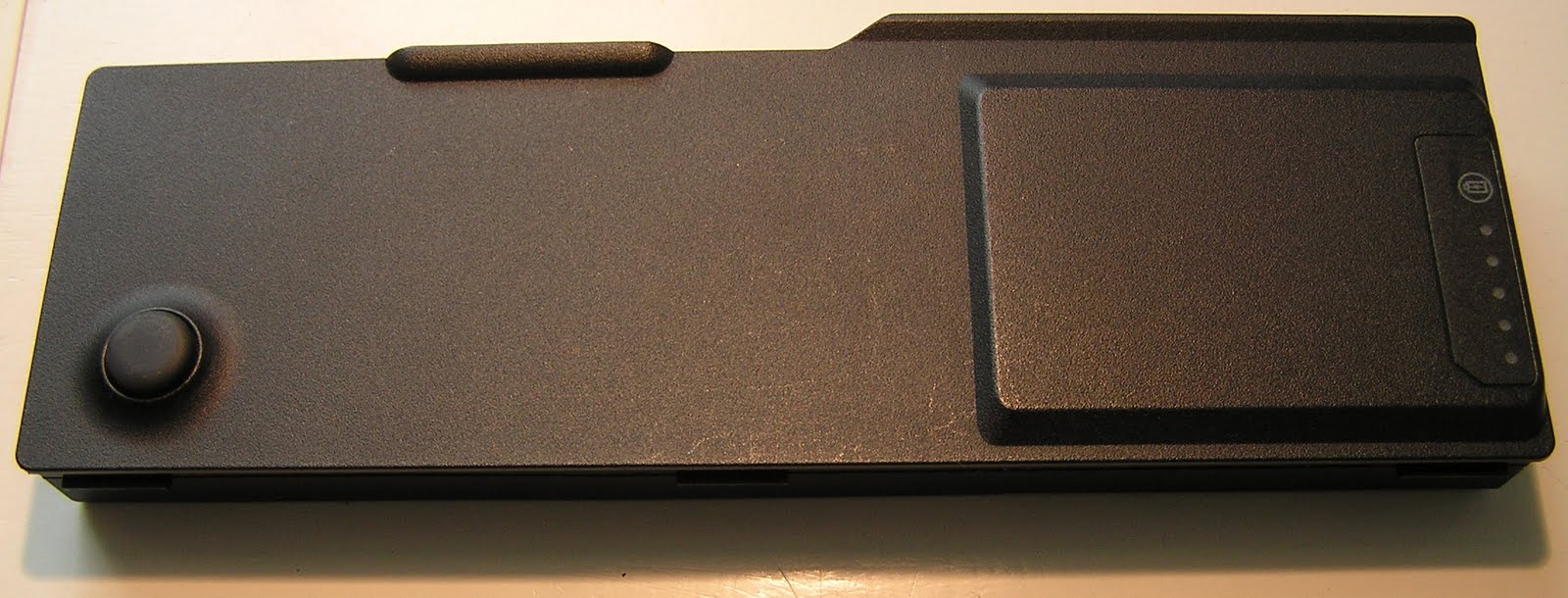

The case consists of two halves: the bottom, which serves as part of the bottom of the laptop, and the top, which slides over the bottom and covers the rest of the battery. The printing on the top is actually a sticker. It may be removed to see the cells, but it does not provide useful access to the battery. In order to gain access, the two halves of the case need to be separated. This is difficult because the bottom slides over the top with considerable overlap, and that overlap is glued together. I decided to carefully pry apart the overlap. I started prying the edges of the bottom away from the top (sideways) using a blade. Once more space was available, I pried apart the overlap using a screwdriver. This did cause a few cracks in the sides of the base and some damage to the overlapping part of the top, but the result is acceptable.

Here you can see the internals of the battery. The cells are connected in parallel in groups of three, and then the three groups are connected in series. At this point, it's possible to measure the voltage of individual groups of cells. The right two groups measure 4.09V and 4.08V, while the left group measures -0.92V. Those measurements imply the right two groups are fully charged and the left group is bad.
The cells are labelled LGDB118650. The number and size make me think they are 18650 cells, just like in many other laptops. At this point, I could replace cells or maybe even build a 6 cell battery out of this 9 cell battery. However, I don't know if the protection circuit needs to be reset using special software.
The protection circuit consists of two circuit boards wrapping around a corner. One board, which I shall call the power board, contains the connector, protection switch MOSFETs and fuses. It is glued to the case with some hard silicone behind the connector. The silicone can be pried away from the case to free the board.


The other board, which I shall call the control board, contains a lot more components. It also has the 5 LED charge state bar graph along one side.


Among other things, the control board has a bq29311 protection IC and a bq20857 IC which seems to be the controller. The latter may be a problem when replacing cells.
Tuesday, June 08, 2010
Microsoft Wheel Mouse Optical button switch replacement

The left button switch on my Microsoft Wheel Mouse Optical started failing. The button did not turn on and off at the point where it clicked; more pressure was needed. This led to failed clicks and unintended double clicks.
The fix was simple. While I didn't have the exact same switch, a larger switch used in many other mice fit perfectly. All I had to do was remove an extra (normally closed) pin from the switch. Before closing the mouse, I also lubricated the wheel to improve the feel and reduce noise.
Thursday, May 27, 2010
Yokohama YK520 tire sidewall cracking

These Yokohama YK520 tires were manufactured and purchased in 2008. In spring 2010 I noticed sidewall cracks in the most central part of the outer sidewall. There was this worryingly big crack, another longer but narrower crack on another tire, and a lot of tiny cracks (or crazing) on all tires. The big crack went all the way through the top layer of rubber, revealing an undamaged black layer underneath.
Sunday, May 16, 2010
Putting 25 fps progressive video on an NTSC DVD
I recently did some research on how to put 25 fps progressive PAL video on an NTSC DVD. Two things became clear quickly: DGPulldown is the best way to deal with the frame rate conversion, and HCenc (HC Encoder) is the best free MPEG-2 encoder.
Those are just two parts of the overall process. There are also other parts, such as resizing, encoding audio and authoring the DVD. Various software packages automate the whole process. I tried out a few of the packages which come with HCenc and DGPulldown. I was disappointed with most. The best package was FAVC.
FAVC is easy to use and reasonably fast, and it produced good quality video. There were only a few minor issues: it encoded with "*AUTOGOP 15" which could lead to a problem after applying DGPulldown, and when testing the "Play all" menu option in Windows Media Player 12, it was only possible to get back to the menu from the first title. Fortunately, it easy to fix some issues and make changes with FAVC. Just stop the process when HCenc starts, edit configuration files, and re-run "Title.bat".
It's possible to create a better and more customized menu using GUI for dvdauthor/MuxMan. That program can be used to continue from the audio and video files created by FAVC. I decided not to use it because of the added complexity and because the "Play all" button worked on my DVD player.
Those are just two parts of the overall process. There are also other parts, such as resizing, encoding audio and authoring the DVD. Various software packages automate the whole process. I tried out a few of the packages which come with HCenc and DGPulldown. I was disappointed with most. The best package was FAVC.
FAVC is easy to use and reasonably fast, and it produced good quality video. There were only a few minor issues: it encoded with "*AUTOGOP 15" which could lead to a problem after applying DGPulldown, and when testing the "Play all" menu option in Windows Media Player 12, it was only possible to get back to the menu from the first title. Fortunately, it easy to fix some issues and make changes with FAVC. Just stop the process when HCenc starts, edit configuration files, and re-run "Title.bat".
It's possible to create a better and more customized menu using GUI for dvdauthor/MuxMan. That program can be used to continue from the audio and video files created by FAVC. I decided not to use it because of the added complexity and because the "Play all" button worked on my DVD player.
Subscribe to:
Posts (Atom)